


A short one this month, but a useful one. Two features that make your lists better without extra work, one new place to use Vibe Prospecting, and a preview of what comes next. Here is what is new.
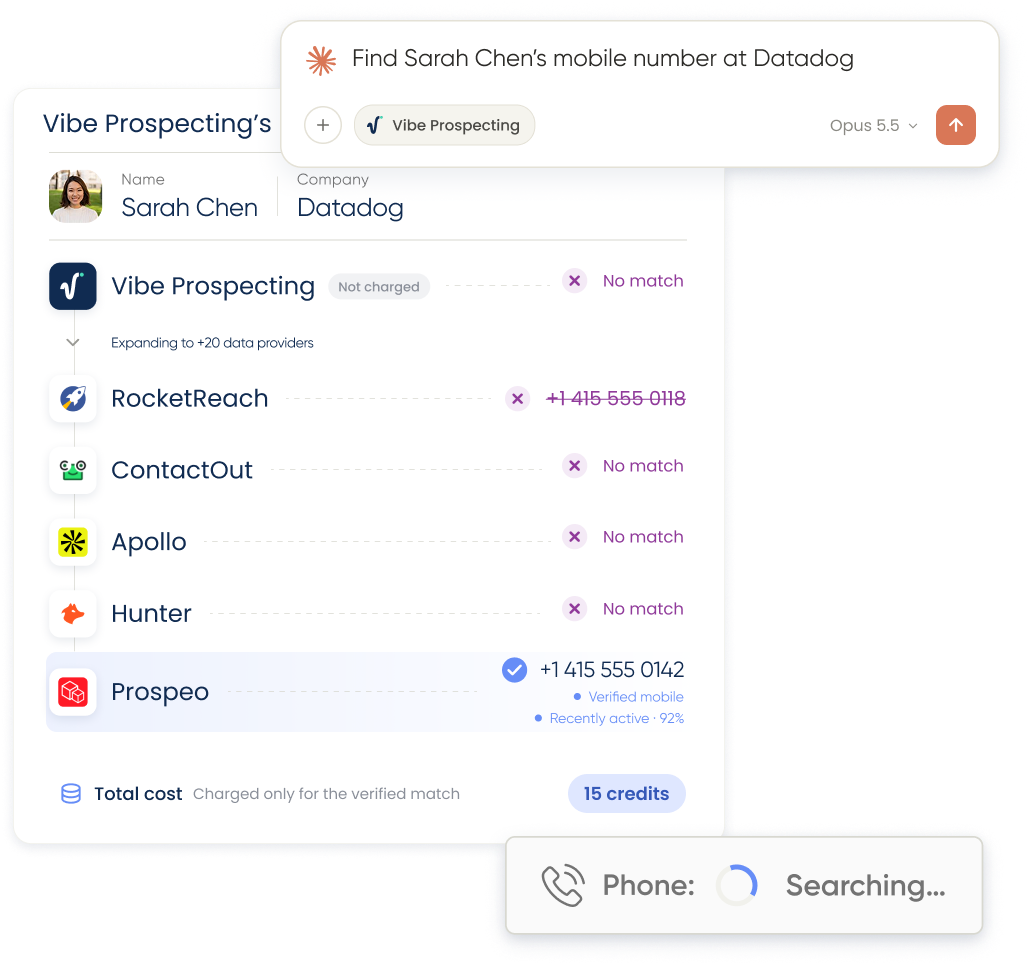
Increase Coverage: More Contact Details (Beta)
The most common frustration in prospecting is finding the right person and then coming up empty on how to reach them. The new Increase Coverage toggle fixes that. It is a new switch in the Show Sample widget, right above Export: turn it on and any contact Vibe Prospecting could not fill in gets retried against trusted third-party sources. Leave it off and the standard Explorium-only flow runs exactly as before.
Because Increase Coverage runs more lookups per contact, exports with it enabled take longer, so they run in the background instead of downloading right away. The export widget links to the Hub, where your dataset shows a live running status and unlocks for download or viewing the moment it is ready. You also get an email with a direct link, so there is no need to keep checking back.
Increase Coverage is live now as a beta through October 12, available on paid plans. Free-tier accounts that turn on the toggle get an upgrade prompt, with the option to purchase a plan or keep exporting with the standard flow.
Read the full Increase Coverage guide, including credits and availability.
Pricing and Cost Estimate
Turning on Increase Coverage changes the cost estimate shown next to Export, so you can see the maximum you will spend before you commit. Because pricing depends on how many contacts actually need a third-party lookup, we are not publishing a fixed per-contact rate here — check the live estimate in the app, or the full breakdown in the docs, before exporting a large list.
Exclude Leads
If you prospect regularly, you know the feeling: you run a fresh search and half the results are people you already have in your CRM or already emailed last month. Exclude Leads puts an end to that.
Give Vibe Prospecting the people and companies you want to skip, and they stay out of your results from then on. Your exclusions are private to your account and you can update them whenever your CRM changes. Every search after that returns only new names, which means less cleanup, no duplicate outreach, and credits spent on prospects you have not talked to yet.
Exclude Leads is rolling out alongside waterfall enrichment. Just tell Vibe Prospecting which contacts or companies to leave out, and it will remember.
Vibe Prospecting in Grok Bot
Vibe Prospecting is built to live inside the tools you already use, and that list just got longer. You can now use Vibe Prospecting in Grok Bot, alongside ChatGPT, Claude, Cursor, and the rest.
The setup takes a few minutes and uses the same connection as Cursor, so one setup covers both. Once connected, you can ask Grok to find companies, build a list, or pull contact details exactly as you would anywhere else Vibe Prospecting runs.
Follow the step-by-step guide to set up Vibe Prospecting in Grok Bot and Cursor.
Coming Soon: AI Research
Today, Vibe Prospecting is great at structured questions: who works where, in what role, at companies of what size. AI Research is for the questions that do not fit in a filter. Does this company sell to hospitals? Who on the leadership team came from a competitor? Has this account announced a new office in the last quarter?
With AI Research you will be able to ask those questions in plain language and get back a researched answer, grounded in live web sources, for one company or a whole list. It is part of the next major Vibe Prospecting release, together with Scoring and Classification, and we will let you know the moment it opens up.
What's Next
Increase Coverage is in beta now, Exclude Leads is rolling out, Grok is live today, and AI Research is on the way. Up next: a progress bar for running jobs, smart column detection that recognizes the relevant columns in your list and lets you choose between increasing coverage or fully enriching with contact data, and an AI Research endpoint running on the same async infrastructure as Increase Coverage. If you have feedback on any of them, reply to the newsletter or reach out through the app. It shapes what we build next.

