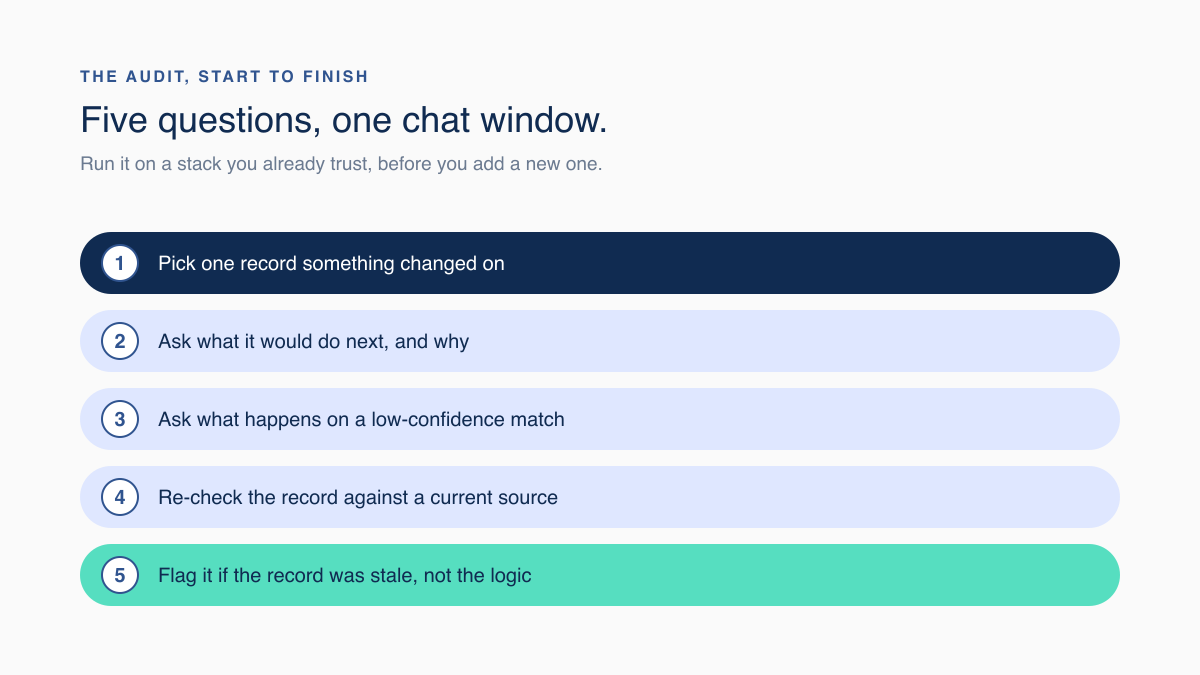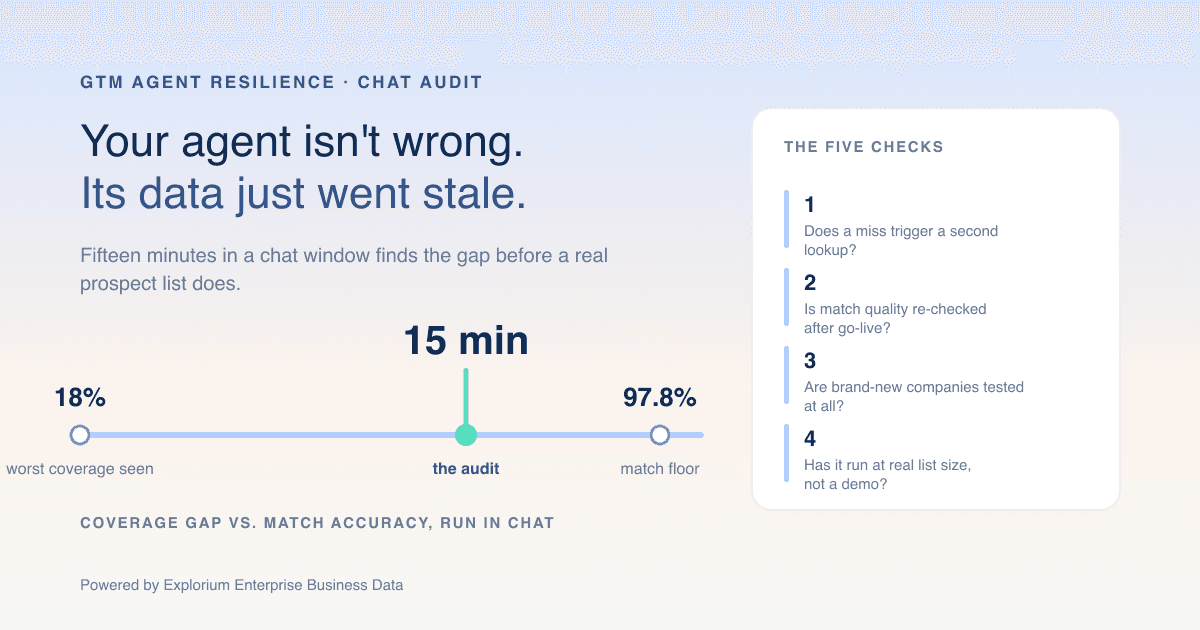
Somewhere in your GTM stack sits an agent that has never been asked what it does when the data comes back wrong. Most teams run a GTM agent stack resilience check the hard way, after a bad batch already went out, instead of the easy way, in a chat window, before it does. Here is the version you can run yourself in about fifteen minutes, on a tool you already pay for, with one real account and a willingness to watch what happens when nobody rehearsed the answer.
The 15-Minute Chat Audit for Any GTM Agent Stack
Pull one account where something recently changed, hand it to whatever agent sits in your stack, and ask it to explain both its next move and the data behind that move. Everything below is detail on how to read what comes back. The audit itself fits between two meetings.
Run It Before You Trust Any Agent With a Real List
- Minutes 1 to 4. Find an account that changed shape recently: new funding, a leadership change, a headcount jump.
- Minutes 5 to 8. Ask the agent what it would do next with that account, and why it picked that move.
- Minutes 9 to 11. Ask what happens when the underlying match comes back low-confidence instead of clean.
- Minutes 12 to 15. Look the account up yourself against a current source and see whether the agent was working from something accurate to begin with.
That last step is the one almost everyone skips, and it is usually where the real answer was hiding the whole time.
Why Agents Fail When Nobody Checked the Data Underneath
A GTM agent only ever reasons over the record it gets handed, so a stale or missing field looks exactly like bad reasoning until someone checks the source. Teams spend weeks rewriting prompts when the actual defect is a company detail that quietly came back empty, and every step downstream inherits that gap.
The Tell That Points at Data, Not Logic
- 90% of a GTM motion can run on autopilot while the remaining 10% is what breaks the whole run, one practitioner put it plainly on LinkedIn this month.
- Another engineer summed up the actual lever: you cannot control a data provider's accuracy quietly slipping, but you can control whether your setup has a fallback or just guesses.
- Nobody gets credit for cleaning up a stale record, so the debt sits there until a batch goes out wrong.
What Happens When Your Data Source Comes Up Empty?
A resilient setup routes a low-confidence or missing match to a second check instead of quietly sending a guess forward, and it logs the miss so someone actually sees the pattern. A brittle one takes whatever the first lookup returns, blank fields included, and hands it straight to the next step.
What a Brittle Setup Looks Like
- One lookup, one shot: a missed match becomes a blank field, not a retry.
- No confidence threshold, so a shaky match and a clean one get treated the same way.
- No record of the misses, so the failure rate creeps up with nobody watching.
What a Resilient Setup Looks Like
- A confidence threshold that routes anything shaky to a second pass instead of accepting it as-is.
- One place to check company and contact details, so a fallback does not mean stitching a second tool's format into your workflow.
- A miss rate someone actually looks at on a schedule, not just once during setup.
Catching a Slipping Match Rate Before It Costs You a Quarter
A published accuracy number reflects the vendor's own test sample, not your account mix, so it drifts quietly unless someone re-checks it against your own records on a schedule. Smaller or newer companies refresh less often than the flagship accounts used in a sales demo, and that gap shows up as worse lead quality weeks before anyone traces it back.
A Cadence That Actually Catches It
- Pull 100 to 200 live records once a month and check them against a source you trust.
- Hold the result against a published number, such as 97.8% and above for company matching, rather than an internal guess.
- Flag anything that drops more than 2 points from the prior check.
The Coverage Hole Nobody Tests: Brand-New Companies
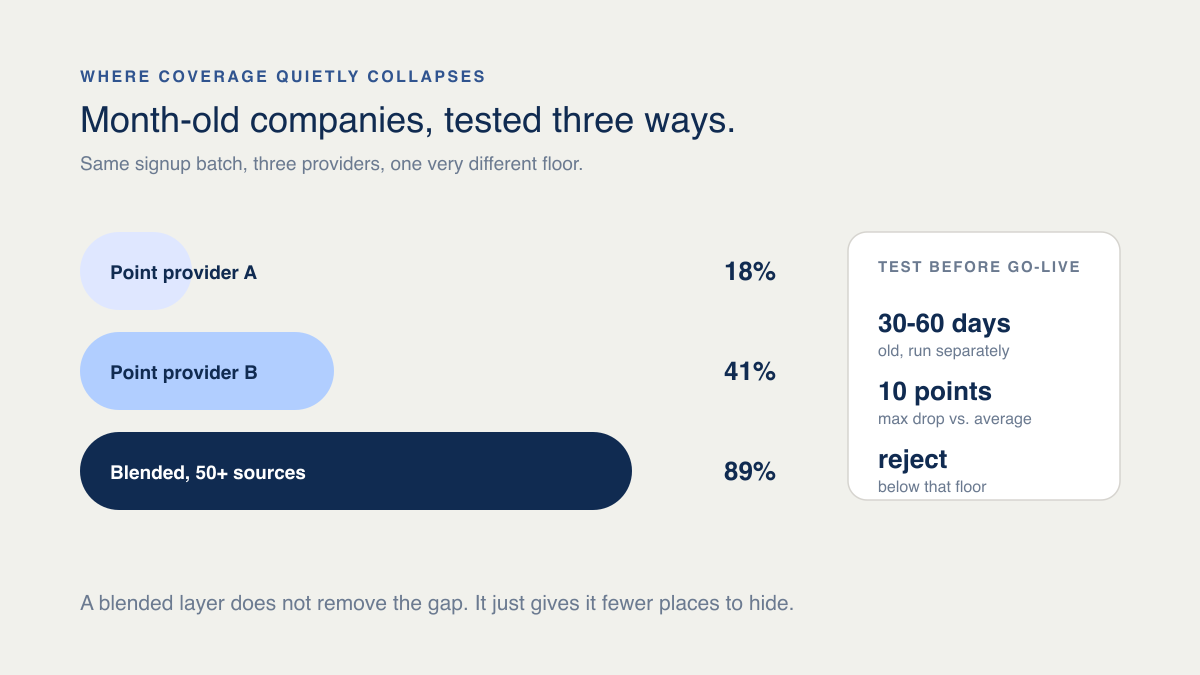
Most data providers refresh their biggest, oldest accounts first, which leaves companies that only just incorporated sitting on thin or missing records. One team tested this directly: 40 recent signups against a point provider's database came back at an 18% hit rate, because founders at month-old companies simply were not in it yet.
How to Test This Before You Commit
- Run a batch of 30 to 60 day old companies through the tool and compare that hit rate to your established accounts.
- Drop any source whose new-company rate falls more than 10 points below its own published average.
| Coverage Angle | A single point source | Second point source, stacked on top | One blended layer |
|---|---|---|---|
| New-company hit rate | Can run as low as 18% | Improves some, still uneven | Built to test at 97.8%+ overall match accuracy |
| Schema per fallback | N/A, only one source | A second format to re-map by hand | One schema across 50+ sources, no re-mapping |
| Batch size per check | Whatever that source's rate limit allows | Bottlenecked by the slower of the two | Up to 1,000 records per call |
| What it costs to test | A paid plan just to sample it | Two paid plans | A free account, shared credit pool |
Why Only 7% of Teams Trust Their Own Data
An October 2025 survey from Cloudera and Harvard Business Review Analytic Services found that only 7% of enterprises call their own data fully ready for AI, which means the model is rarely the weakest link. Practitioners describe the actual readiness work, checking freshness and edge cases, as the least visible part of the job, which is exactly why it gets skipped.
What That Changes About Priority
- Treat this as a check you repeat, not a box you tick once during a pilot.
- Weight checks that catch drift after go-live over ones that only confirm things looked fine at launch.
- Favor one place to check company and contact data over a pile of point tools that each need their own audit.
A Founder Runs the Audit Before a Demo
A two-person team is three weeks into a tool that started calling its sequencer an agent. Before a customer demo, the founder picks eleven stalled accounts and asks the tool what it would do with each one. Ten answers come back sound. The eleventh recommends re-engaging a buying committee at a company that was quietly acquired two months earlier.
They open a chat, paste in the current list, and ask for fresh company details on all eleven. Four have changed enough to matter. The tool was not broken. It was reasoning over a list that stopped being accurate back in the spring. They fix the list first, and the demo goes fine.
What to Check Before an Agent Touches a Real Prospect List
Before any agent sends to a real list, run it at the size you actually send, confirm it halts rather than degrades below a confidence line, and make sure a broken step gets flagged in minutes instead of after the send.
Pre-Send Safety Checks
- Test on a full-size batch, not a 20-record sample that never surfaces the real ceiling.
- Confirm the workflow stops, not quietly degrades, once confidence drops below your line.
- Verify a broken step raises a flag within minutes, not after the list has already gone out.
A broken enrichment step is also a reputation risk, not just a data one; see Explorium's SOC 2 compliance overview for B2B data vendors if a security review is part of your own check.
How Vibe Prospecting Keeps the Data Layer From Slipping
Vibe Prospecting is a connection you add once to Claude or ChatGPT, so the re-check in step four of the audit above becomes something you do yourself in plain language instead of a ticket you file and wait on. Powered by Explorium Enterprise Business Data.
One Connection Instead of a Stack of Point Tools
- Company search across 150M+ profiles and contact details for 800M+ people sit behind one connection.
- Recent company activity across 18 categories, so a funding round or a leadership change surfaces before your outreach does.
- More than 50 premium sources feed that one connection, which is why a second fallback tool rarely earns its keep.
Built to Handle a Real List, Not a Sample
- Up to 1,000 records per call at 100 requests per second, enough to re-check a whole pipeline in one pass.
- Company matching at 97.8% and above, a published number your own audit can hold against.
- A free account with a shared credit pool, so testing this costs nothing before you commit.
Most teams add the connection straight from the Claude or ChatGPT connectors directory. If your GTM engineering already runs through Claude Code, the Vibe Prospecting Plugin is the supported route in, and the config below is the short version of wiring it in. Background on how the connection itself works: Explorium's MCP overview.