

gtm-engineering

Running GTM Alone in 2026: The One-Person GTM Team Playbook

The one-person GTM team playbook for 2026: cut your stack down to three systems, schedule prospecting jobs that finish while you sleep, and prove impact fast.

Vibe Prospecting team9 min readAugust 23, 2026
Running GTM Alone in 2026: The One-Person GTM Team Playbook

TL;DR

  • Three systems, not five tools: a CRM, one sending tool, and Vibe Prospecting as the single chat plus data connection. Every extra tool is something only you can fix.
  • Say no in writing: a four-question intake test (recurring, rule-based, measurable, safe to run alone) keeps you from becoming the company automation help desk.
  • Schedule work, not sessions: 3 to 5 scheduled jobs with spend limits and staging-file output produce pipeline while you are offline.
  • One connection covers the data: 150M+ company profiles, 800M+ professional profiles, and 18 categories of buying signals through one Vibe Prospecting setup, free to start.
  • Big runs stay out of your chat window: server-side processing handles up to 1,000 records per request, so scheduled jobs never choke on volume.
  • You are not behind for being solo: the 2026 State of GTME survey found most GTM engineers work alone, and one operator's systems can source pipeline comparable to 5 to 8 SDRs.

A one-person GTM team is not a compromise anymore. It is how most of the discipline actually operates: the 2026 State of GTME survey of 228 practitioners across 32 countries found the typical GTM engineer works alone, and a quarter name bandwidth as the thing holding them back. This playbook is written for that person, whether you are a founder doing GTM on the side, a fractional operator billing by the hour, or the first systems hire at a small company. It covers the work you keep, the work you turn down, the three systems worth running, and how prospecting in chat keeps the data side of the job from eating your week.

The math of running GTM alone

Every tool you adopt costs you roughly the same thing: login credentials to protect, a billing model to track, field names to map, and failure modes only you can debug. Benchmarks put the average in-house GTM engineer at 4 to 5 tools. With a team behind you, that is manageable. Alone, it is a slow leak: connector scripts and spreadsheet handoffs break quietly, you find out days later, and every repair hour comes out of the hours you meant to spend building.

There is a simple test for whether your setup survives solo operation. Ask of every tool: if I went offline for two weeks, would this keep working? Anything that fails the question is a liability, because you are the only person who understands it. The whole playbook below is built around passing that test.

Say no first: the work a solo operator refuses

Before deciding what to own, decide what you will not touch: writing outreach copy, producing content, administering the CRM, and babysitting experimental tools. The refusal list matters more than the ownership list because your limit is hours, not skill.

The keep, hand off, cut table

WorkstreamKeepHand offCut
Tool experimentsNoNoYes, review quarterly and remove
Email and message copyNoFounders or marketingN/A
CRM cleanup and adminNoAn ops person or adminManual data entry
Request intakeYes, with a written testNoDrive-by Slack asks
Scheduled prospecting jobsYes, 3 to 5 of themNoAnything past five
The data connectionYes, exactly oneNoNo

Notice the pattern: you keep the systems that compound (data, scheduled jobs, prioritization) and shed the work that only consumes hours. A solo operator who writes sequence copy is an expensive copywriter; a solo operator who builds the machine that feeds the copywriter is a team multiplier.

The three assets worth owning

Own exactly three things: one data connection that answers every company, contact, and timing question; a small set of scheduled jobs that run unattended; and a written test that filters incoming requests.

  • The data connection. One place you ask for companies that fit your ideal customer, the right people at those companies, and evidence they are ready to buy. Not five subscriptions stitched together.
  • The scheduled jobs. Three to five recurring jobs that discover accounts, pull contact details, and watch for buying activity without you in the loop.
  • The intake test. A one-page rubric that decides what gets built, what waits, and what gets a polite no.

Everything in the rest of this guide is one of these three assets in detail.

Shrink the stack to three systems

The target stack for a one-person GTM team is three systems: your CRM as the record of truth, one sending tool for outreach, and one chat plus data layer for everything about companies, people, and timing.

The consolidation move is collapsing discovery, contact data, and buying signals, which usually means three separate subscriptions with three separate billing meters, into a single connection your AI assistant can call. The pattern is the same one engineers use to build a B2B data layer for Claude Code agents, just without writing code.
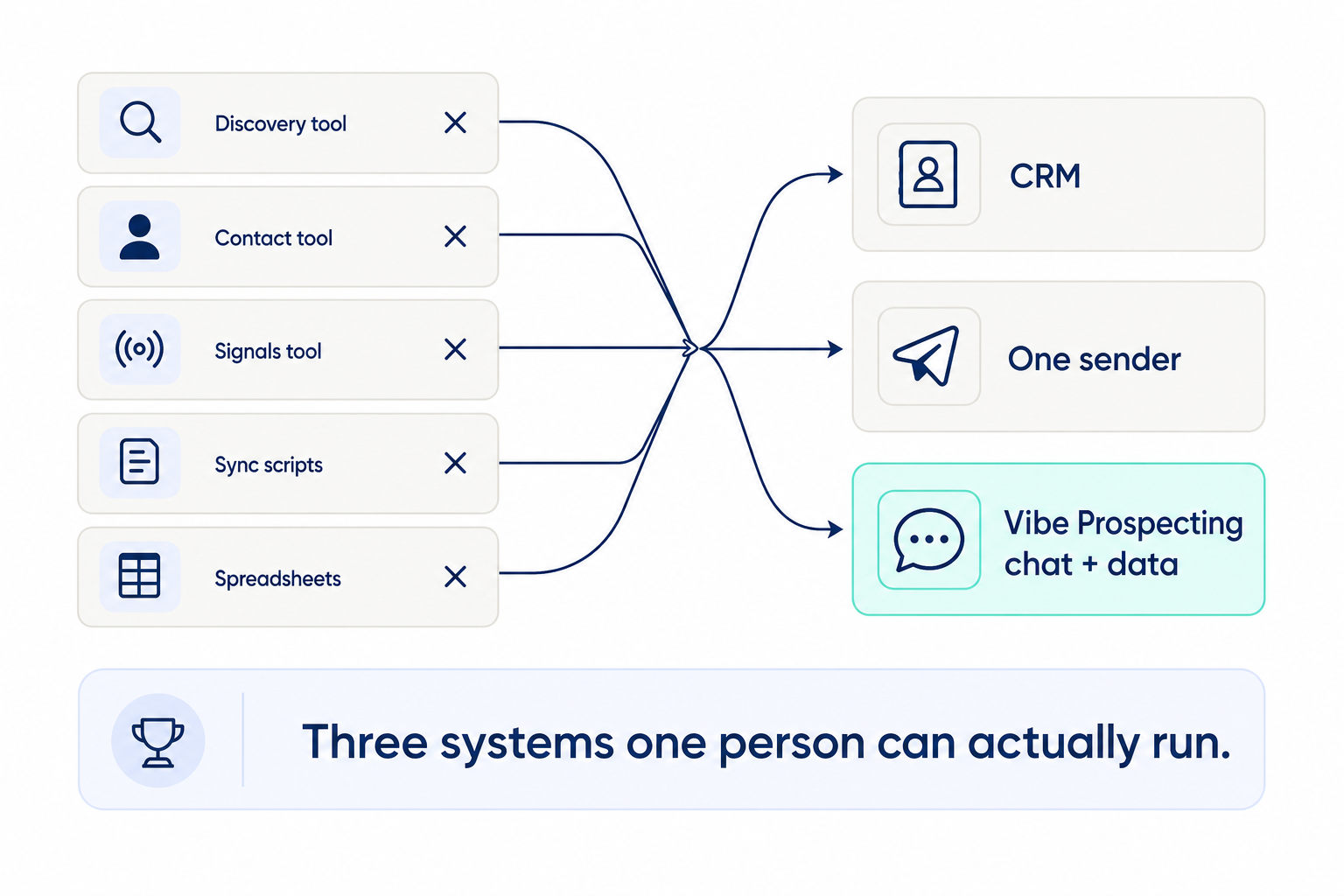
Five point tools collapsing into the three systems a one-person GTM team can run: CRM, one sender, and Vibe Prospecting chat plus data

Once a quarter, hold each remaining tool against a side-by-side data provider comparison and against the two-week test. If it cannot justify itself, cut it. A stack you can hold in your head is a stack you can hand over cleanly if the team ever grows past one.

Prospect in chat: one connection instead of five tools

Vibe Prospecting is the chat plus data layer this playbook runs on: you ask for prospects in plain language inside Claude or ChatGPT, preview a sample, then build the full list, all through one connection. It is powered by Explorium Enterprise Business Data, and three properties make it fit the solo model specifically.

Coverage in one place

  • 150M+ company profiles and 800M+ professional profiles, with company details, funding history, and the tools a company uses, all behind one connection.
  • 18 categories of buying signals, over 80 signal types, covering hiring, funding, website changes, and more, so you do not need a separate signals subscription.
  • Results are matched against 50+ premium sources with 97.8%+ company match accuracy, so you never maintain your own fallback logic between vendors.

Scale that happens on the server

  • Big runs execute on Explorium's infrastructure through the AgentSource API, up to 1,000 records per request at 100 requests per second, documented at explorium.ai/mcp.
  • Connections that load every record into the chat context stall around 20 to 100 prospects. Server-side execution is what lets a scheduled job process a thousand accounts while you are asleep.

A cost model one person can defend

  • Free account, no sales call, first result in minutes.
  • One credit pool covers every kind of request, which cuts typical agent-workload spend 30 to 60% versus per-seat or per-endpoint pricing.
  • Every build starts with a preview: 5 sample records plus a cost estimate before any credits are spent.

Setup in one click

Add Vibe Prospecting from the Claude Connectors Directory (claude.ai, Settings, Connectors) or the ChatGPT equivalent. Claude Code users who prefer a config file can register it manually:
Claude Code
{
  "mcpServers": {
    "vibe-prospecting": {
      "command": "npx",
      "args": ["-y", "@explorium-ai/vibeprospecting-mcp"],
      "env": { "EXPLORIUM_API_KEY": "your_api_key_here" }
    }
  }
}

For custom agents and Claude Skills, the open-source Vibe Prospecting Plugin is the canonical wiring reference.

Jobs that finish while you sleep

A scheduled prospecting job has three parts: it runs on the server rather than in your open chat, it carries spend limits, and it writes to a staging file instead of straight into the CRM. This is the asset that turns part-time hours into full-time output. We covered the scheduling mechanics in outbound automation with Claude Code scheduled jobs; here is the shape of one job:

Text
# jobs/friday-signal-brief.md
Every Friday at 07:00:
1. Check every account in accounts.csv for new buying signals
   from the last 7 days (funding, sales job openings, site changes).
2. For each account with a signal, add 2 likely buyers with
   work emails from premium sources.
3. Write everything to staging/signal-brief.csv with a run log.
4. On any error: stop, log it, do not retry, do not touch the CRM.

The guardrails live next to the job, in plain text the agent reads before every run:

Text
# guardrails.md - read before every run
- Always preview first: 5 sample records + cost estimate
  before any full build.
- Stop if the estimate is above 400 credits for one run.
- Stop if sample match confidence is under 92%.
- Output goes to staging files only. The CRM is written
  by a human, after review.

The design principle behind all of it: a bad run should cost you five preview records and a log entry, never a polluted CRM or a burned credit balance. Production teams running this pattern at agency scale are profiled in Claude Code for GTM automation in production.

Automate the data before you automate the emails

The order of automation matters: account discovery first, then contact details, then buying-signal watching, then routing into your CRM staging file. Outreach automation comes last. Automating messages on top of a shaky data layer just produces confident mistakes at scale.

  1. Discovery: a recurring job that finds new companies matching your ideal customer definition.
  2. Contact details: the right people at each account, with work emails and phone numbers pulled from premium sources.
  3. Timing: alerts when target accounts raise money, post sales job openings, or change their website.
  4. Routing: cleaned-up records into a staging file with a run log, then into the CRM on your review.

Hold the line on what stays manual for now: first-touch copy keeps a human review step until reply quality is proven, and nothing automated ever touches billing, contracts, or data deletion.

A four-question test for every request

Every "can you automate this?" gets scored against four written questions, and only a request that passes all four gets built: does it recur, is it rule-based, does it move a pipeline number, and can it fail safely with nobody watching?

  • Recurring? Weekly or more often. One-time asks are tasks, not pipelines.
  • Rule-based? The logic fits on a page. Anything needing judgment stays human.
  • Measurable? It moves meetings booked, qualified accounts, or reply rate.
  • Safe unattended? A failure stops cleanly without waking anyone or corrupting data.

Score requests in the open so requesters can self-serve the verdict:

Text
# intake.md - scored for every request
request: "Ping me when target accounts post sales job openings"
recurring: yes (daily watch)
rule_based: yes (job-posting signal -> Slack alert)
pipeline_metric: qualified accounts flagged per week
safe_unattended: yes (alert only, no data written)
verdict: BUILD (queue position 1)

Publish the rubric where everyone can see it. In practice, half the requests disappear once people can score their own idea before asking.

Your week in five short blocks

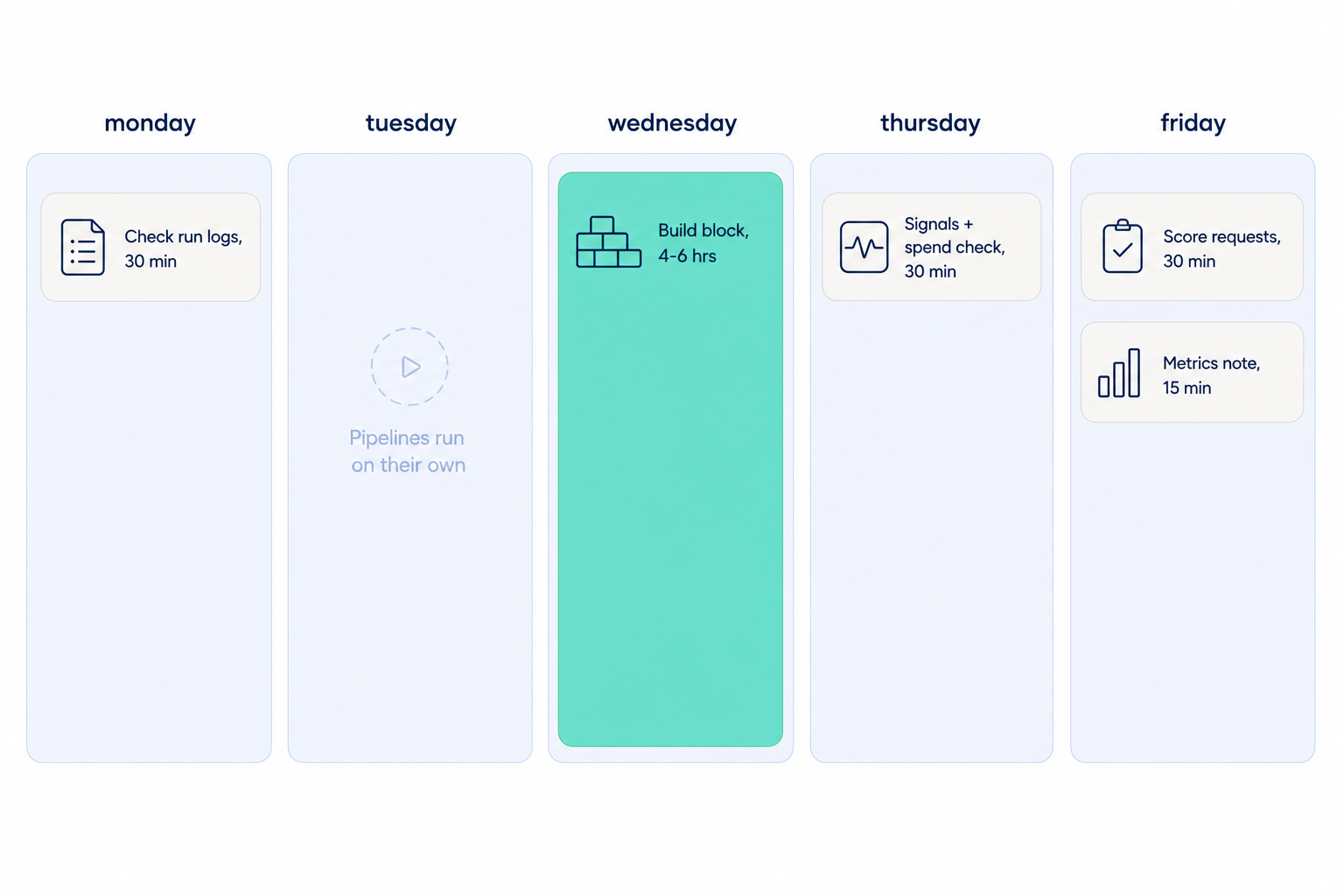
The working rhythm is 8 to 10 focused hours: two short monitoring windows, one protected build block, one intake review, and one metrics note. Fractional operators billing $75 to $200 an hour structure entire engagements around this rhythm.

BlockWhenTimeWhat happens
Build blockOne fixed day4-6 hrsShip exactly one improvement or one approved request
Monitor 1Monday30-45 minRead run logs, move staged records into the CRM, flag failures
Monitor 2Thursday30 minCheck signal alerts, credit spend, and match-rate drift
Intake reviewFriday30 minScore new requests, publish the queue
Metrics noteFriday15 minOne message: accounts found, contacts added, meetings influenced
Weekly rhythm for a one-person GTM team: two short monitor windows, one protected build block, an intake review, and a Friday metrics note

Treat the build block like a customer meeting: it does not move for a Slack ping. And notice the quiet feature of this model: a week where you build nothing still ships output, because the scheduled jobs run regardless.

The first 30 days: make one number move

Prove the model in a month: connect the data layer in week one, ship one scheduled discovery job, and report a single pipeline number every Friday. The systems one operator builds can source pipeline comparable to 5 to 8 SDRs, but leadership only believes it when a number moves early.

  • Day 1: create a free account and add Vibe Prospecting from the Claude or ChatGPT Connectors Directory.
  • Day 2: write your ideal customer definition as a one-page file, then preview it: 5 sample records and a cost estimate, zero credits spent.
  • Week 1: schedule the discovery job and one buying-signal watch, both writing to staging files with run logs.
  • Week 2: publish the four-question intake rubric and send the first Friday metrics note.
  • Weeks 3-4: add contact details to the discovery output, cut the first tool that fails the two-week test.

The Friday note is your job security in one message: accounts found, contacts added, meetings influenced. When those numbers climb while your tool count falls, the one-person model has proven itself. Get started with Vibe Prospecting and ship the first job this week.

FAQs

Frequently Asked Questions

Get Started Banner

Get Started for free

Sign Up
One-Person GTM Team Playbook 2026: Run GTM Alone