Stop Cleaning Duplicates by Hand: Match Company Records the Smart Way
Match company records across CRM, spreadsheets, and vendor feeds with Vibe Prospecting. Two-pass method, 97.8%+ accuracy, no fuzzy-logic coding required.
Vibe Prospecting team8 min readJuly 29, 2026
TL;DR
One chat or web app session covers everything: Vibe Prospecting, powered by Explorium Enterprise Business Data, pulls from 50+ sources so you get deterministic and smart matching in one request, not separate lookups per tool.
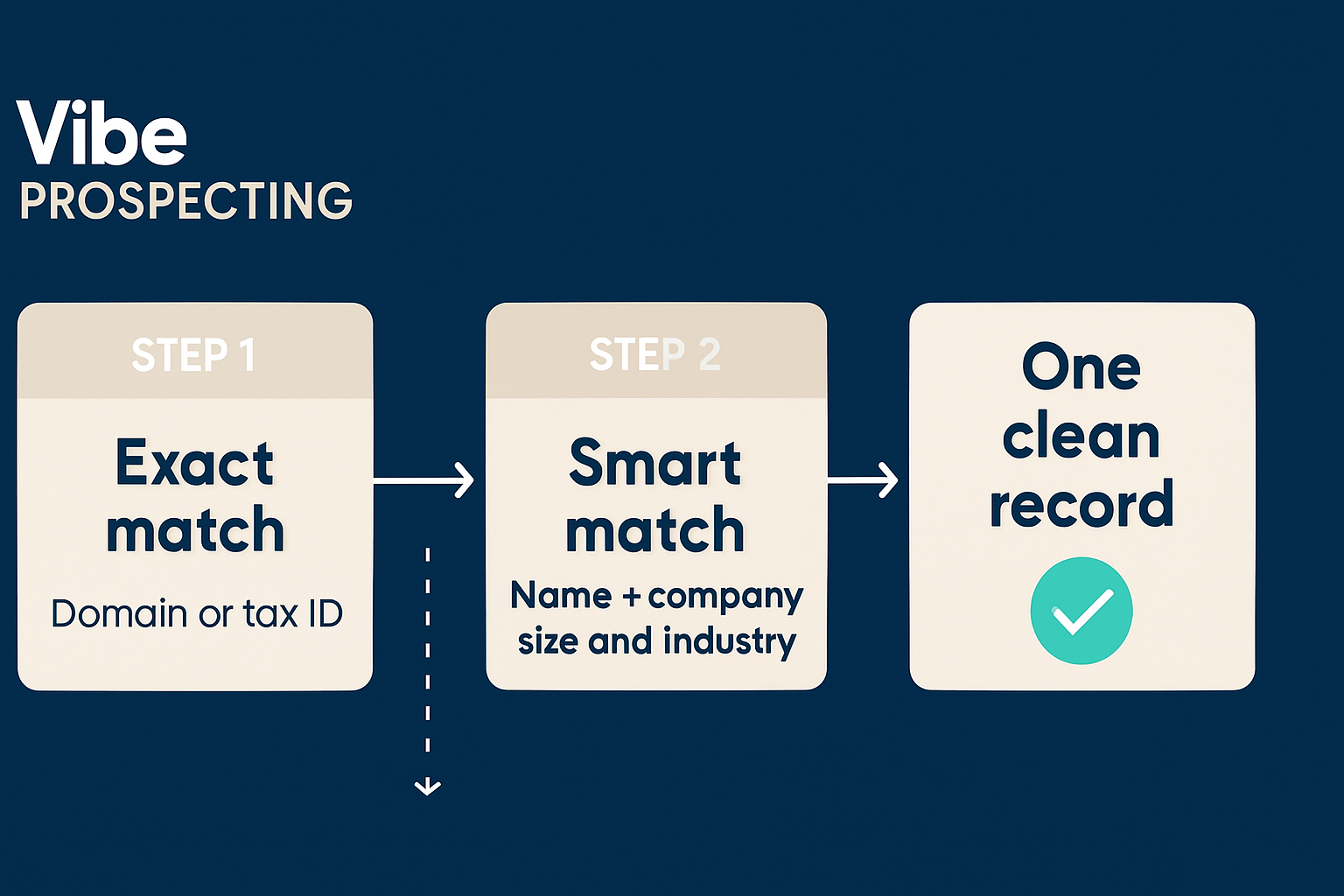
Two-pass pattern: run exact matching on domain or tax ID first, then let the smart fallback handle typos, abbreviations, and legal-suffix variants on what remains.
The underlying match engine resolves records at 97.8%+ accuracy, the benchmark to hold any manual deduplication process against.
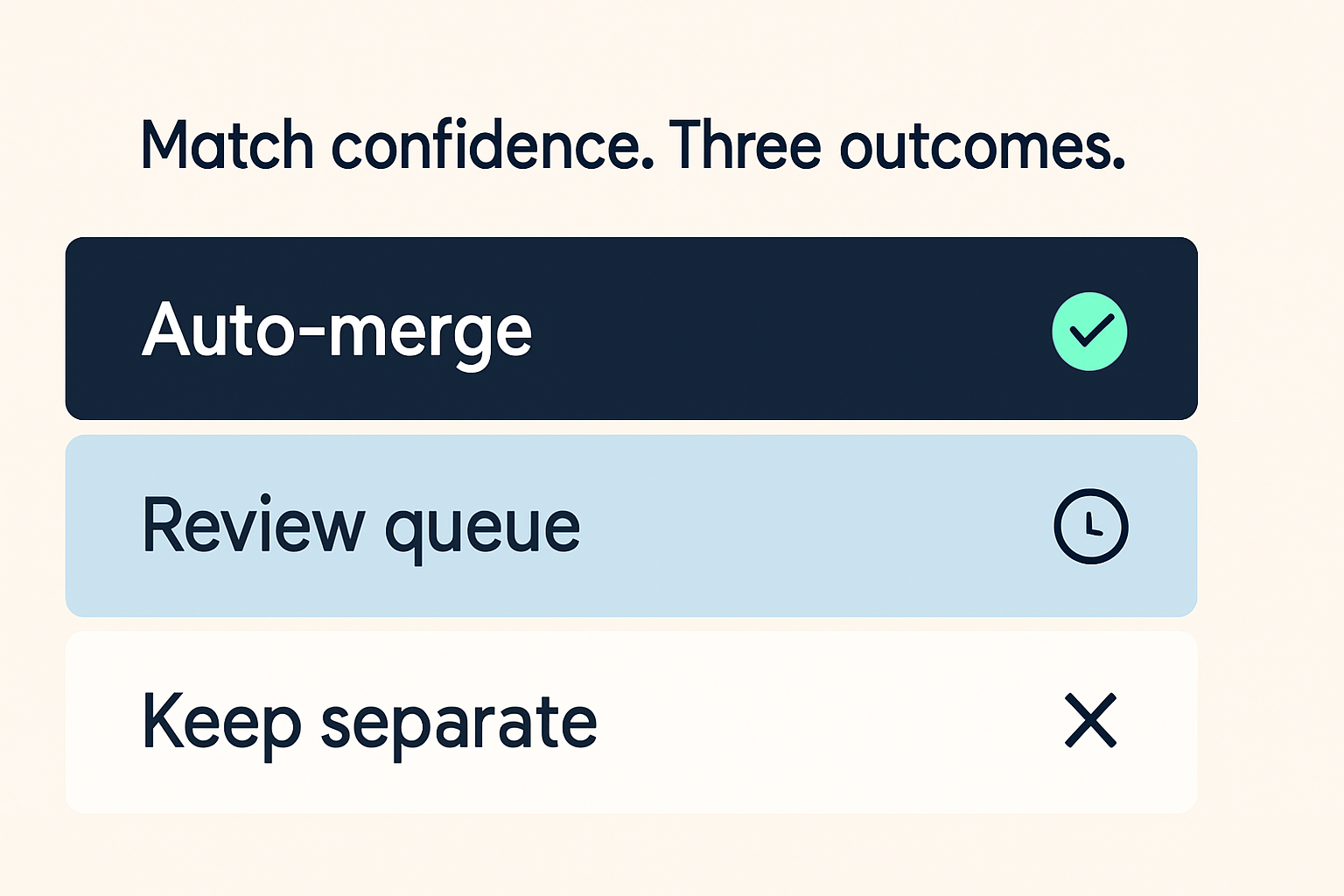
Auto-merge above 90% confidence, send 70-90% to a review queue, keep anything below 70% as separate records until you have more signal.
Start with 100 records to tune your confidence thresholds before running your full CRM, spreadsheet, or vendor feed through the pipeline.
One place for all your matching: Vibe Prospecting, powered by Explorium Enterprise Business Data, pulls from 50+ sources so you get exact and smart matching in one request instead of separate lookups per tool.
Two-pass pattern: run exact matching on domain or tax ID first, then let the smart fallback handle typos, abbreviations, and legal-suffix variants on what remains.
97.8%+ accuracy: the benchmark the underlying match engine hits, and the number to hold any manual deduplication process against.
Three confidence bands: auto-merge above 90%, send 70-90% to a review queue, keep below 70% as separate records.
Start small: run 100 records first to tune thresholds before putting your full CRM or vendor feed through the pipeline.
If your sales data lives in three places and none of them agree on how to spell "Acme Corporation," you have a matching problem. "Acme Corp," "ACME Incorporated," and "Acme" are the same company, but your CRM, your spreadsheet, and the vendor list treat them as strangers. Vibe Prospecting closes that gap automatically, using the same two-pass approach that data engineers build by hand, without the hand-building. Exact matching on reliable identifiers like domain or tax ID catches 60-70% of records instantly. Smart scoring handles the rest, including the legal-suffix variants and abbreviations that exact matching always misses. The underlying engine, powered by Explorium Enterprise Business Data, resolves records at 97.8%+ accuracy across 150M+ company profiles.
Why Do Company Records Pile Up as Duplicates Across Sources?
Your CRM, vendor feed, and spreadsheet each stored the same company under a slightly different name or with a missing field, so any join that requires an exact string match only connects the records that happen to line up perfectly. Everything else accumulates as a duplicate. The fix is a two-pass flow: exact identifiers first, scored similarity second.
Where Exact Matching Breaks Down
Legal-suffix differences like "Corp" versus "Corporation" break string equality even for the exact same company.
Records with no shared identifier, no common domain or tax ID, have nothing to match on at all.
Phonetic near-misses never collide on a character-level comparison.
What a Two-Pass Flow Unlocks
The exact pass resolves the majority of your records in milliseconds with near-zero false positives.
The smart scoring pass catches typos and abbreviation variants that the exact pass never touches.
A confidence score on every result lets you auto-merge the high-confidence matches and route the rest to a human without writing any custom logic.
Exact Matching vs Smart Scoring: What Is the Difference?
Exact matching requires both records to share an identical identifier and returns a yes or no answer. Smart scoring compares similarity across multiple weighted fields and returns a number between 0 and 100. Use exact matching first because it is fast and reliable when the identifier is present. Use smart scoring second to catch everything that falls through.
Side-by-Side Comparison
Dimension
Exact Matching
Smart Scoring
What it needs
A shared identifier like domain or tax ID
Weighted fields like company name, location, and employee count
What it returns
Match or no match
A confidence score, typically 0-100
Speed
Milliseconds, fast index lookup
Slower, scores multiple candidate pairs
False-positive risk
Near zero when the identifier is clean
Real, kept in check by a confidence threshold
Catches typos and abbreviations
No
Yes
When to use it
First, on every record
Second, on the unmatched remainder only
When to Lean on Each
Run the exact pass on every record without exception. Only send unmatched records into the scoring pass, which keeps compute cost low and prevents the scoring step from second-guessing records that already resolved cleanly. For the underlying math behind scoring similarity across fields, this probabilistic matching breakdown covers the mechanics in depth.
How to Handle Company Names With Typos, Abbreviations, or Ticker Symbols
Clean up the name before you score it: lowercase both strings, strip legal suffixes like Inc and Corp, and standardize domains so protocol and www differences do not count as mismatches. Normalizing first cuts down how much work the scoring step has to do and resolves most casing and suffix mismatches before any similarity math runs.
Fields to Clean Before Scoring
Company name: lowercase, strip "Inc," "Corp," "LLC," "Ltd" before comparing strings.
Domain: strip the protocol and "www." so "acme.com" and "https://www.acme.com" resolve to the same value.
Ticker symbols: map to a legal entity name via a lookup table before feeding into any scoring step.
Text
def normalize_company_name(name: str) -> str:
    suffixes = ["incorporated", "corporation", "corp", "inc", "llc", "ltd"]
    n = name.lower().strip()
    for suffix in suffixes:
        n = n.replace(f" {suffix}", "").replace(f", {suffix}", "")
    return n.strip()

# Examples
normalize_company_name("ACME Corporation")    # -> "acme"
normalize_company_name("Delta Air Lines, Inc") # -> "delta air lines"
Common Cleanup Pitfalls
Too much stripping can collapse two different companies into the same cleaned-up name. Always pair a name score with at least one other field as a tie-breaker.
Edit distance alone cannot match "IBM" to "International Business Machines." Ticker symbols need a lookup, not a character-similarity check.
Scoring on name alone inflates false positives whenever two companies share a short or generic word in their name.
Matching Company Records When There Is No Shared ID
When no shared identifier exists, match on a composite of cleaned company name plus website domain. Add employee count or location as a tie-breaker when two candidates score similarly on the composite alone. A composite key covers most B2B records without requiring a pre-agreed identifier between systems.
What to Match On Without a Shared ID
Cleaned company name plus website domain as the primary composite key.
Employee count range and location as tie-breakers when two candidates score within a few points of each other.
Vibe Prospecting accepts name, domain, and tax ID together in one request, so you can send everything you have and let the engine decide which fields carry the most signal.
Two different companies can share a cleaned-up name like "Delta" once suffixes are stripped, with neither domain nor tax ID present to break the tie.
Franchise and subsidiary structures can put one domain under dozens of legally separate entities.
Add a third tie-breaker, address or employee count, before auto-merging any composite-key match that scores below 95% confidence.
Setting Confidence Thresholds to Prevent Wrong Merges
Use three bands instead of one cutoff: auto-merge above 90%, route 70-90% to a review queue, and keep anything below 70% as separate records. A single hard cutoff either merges companies that just happen to score similarly or leaves real duplicates unresolved because they fell one point short of the line.
Confidence Decision Matrix
Confidence Score
Action
Why
90-100%
Auto-merge
Multiple signals agree, false-positive risk is low
70-89%
Queue for manual review
Partial match on name or domain, worth a human check
What to Do When an Exact Lookup Returns Zero Results
Zero results from an exact lookup means the identifier is missing, formatted inconsistently, or out of date, not that the company does not exist. Treat it as unresolved and route it into the smart scoring pass automatically. Discarding zero-result records silently creates the same duplicate the next time that company enters through a different source.
The Zero-Result Fallback Flow
Log every zero-result lookup with its input fields so the failure mode is auditable later.
Route zero-result records into the scoring pass automatically, no manual triage needed.
Re-run the exact pass on a nightly schedule, since a domain field added today can resolve a record that failed yesterday.
Common Causes of Zero Results
The domain field is blank or points to a parent company instead of the subsidiary.
A tax ID was entered in different formats across two source systems.
The company changed its name or domain after the record was first created.
Merging Records From Three Sources Into One Profile
Resolve every source to a single company ID first, then merge field by field using a source-priority rule rather than letting the most recently updated value win. Merging before resolving the identifier is the leading cause of silent duplicates in multi-source pipelines.
Merge Steps
Resolve your CRM, spreadsheet, and vendor feed each to a company ID independently using the two-pass flow above.
Group all records that share a company ID into one canonical profile.
Apply a source-priority rule per field: CRM wins on ownership and relationship fields, vendor feed wins on company size and industry data.
Merge Mistakes to Avoid
Last-write-wins overwrites a correct CRM field with a stale vendor value just because the vendor feed ran last.
Merging before every source resolves to a shared company ID silently recreates the duplicate you were trying to eliminate.
Skipping a per-field priority rule leaves ownership and company-size fields fighting over the same slot.
Text
import requests

# After resolving to a company ID, pull company data in the same session
url = "https://api.explorium.ai/v1/businesses/enrich"
payload = {
    "business_id": "biz_8f2c...",
    "fields": ["revenue", "employee_count", "industry"]
}
headers = {"API_KEY": "your_api_key_here"}

enriched = requests.post(url, json=payload, headers=headers).json()
# {"business_id": "biz_8f2c...", "revenue": "$50M-$100M", "employee_count": 210, "industry": "SaaS"}
How Vibe Prospecting Matches Company Records at Scale
Vibe Prospecting, powered by Explorium Enterprise Business Data, covers exact and smart matching in one request against 150M+ company profiles, handles up to 1,000 records per call, and gives you a working result the same day you sign up. Those three things together are what let a 500-row test become a nightly pipeline without rewriting anything.
One Request Against All Sources
Send name, domain, and tax ID together in one request. The engine applies exact and smart matching internally and returns a company ID plus a confidence score per record.
Once you have a company ID, ask for employee count, revenue range, and industry from the same session, no second lookup needed.
Sign up and get a working result the same day, no sales call required.
One credit pool covers both matching and company data lookups, so you are not paying twice for the same workflow.
You can preview a sample of matched records before the full run so you know what you are getting before committing credits.
Text
# Using Vibe Prospecting to match company records in a Python session
from explorium import Client

client = Client(api_key="your_api_key_here")
result = client.businesses.match(
    businesses_to_match=[{"name": "Acme Incorporated", "domain": "acme.com"}]
)
print(result.business_id, result.match_confidence)
# biz_8f2c... 0.98
From First Match to a Production Pipeline
Start with 100 records, validate the two-pass pattern, tune your confidence thresholds, then graduate to the full pipeline once you know the numbers hold.
Step 1: Open Vibe Prospecting in chat or at app.vibeprospecting.ai and describe what you need to match.
Step 2: Run 100 records through and look at the confidence score distribution before setting any thresholds.
Step 3: Tune the auto-merge and review-queue cutoffs against 20-30 manually confirmed pairs from your own data.
Step 4: Route your CRM, spreadsheet, and vendor feed through the same flow to a single company ID.
Step 5: Pull employee count, revenue, and industry for every resolved ID and schedule the run nightly.
What to Watch After Launch
Track match rate week over week. A drop usually means an upstream source changed its domain or name format.
Watch your review queue. If it grows steadily, your thresholds need adjusting, not more reviewers.
Re-check a sample of auto-merged records every month to catch false positives before they compound across the CRM.
The Three Questions That Actually Matter
Company record matching comes down to: does one tool cover all your sources, does it handle your record volume without a hard ceiling, and does pricing work for a matching-heavy month. Vibe Prospecting, powered by Explorium Enterprise Business Data, handles all three: one session covers 50+ sources, up to 1,000 records per call, and one credit pool across matching and company data lookups. For teams that have been comparing entity matching solutions for 2026, those are the right constraints to filter on.