How to Stop Your AI Agent From Creating Duplicate Records: Entity Matching Checklist
A checklist for wiring entity matching into your AI agent before every write call: confidence thresholds, MCP annotation logic, and setup.
Vibe Prospecting team9 min readJuly 29, 2026
TL;DR
One connection handles everything: Vibe Prospecting resolves, enriches, and links company and contact records from a single chat or plugin connection -- no second data source needed.
The gating number is 97.8%+: route matches at that confidence to auto-write, and everything below it to a human review queue. Powered by Explorium Enterprise Business Data.
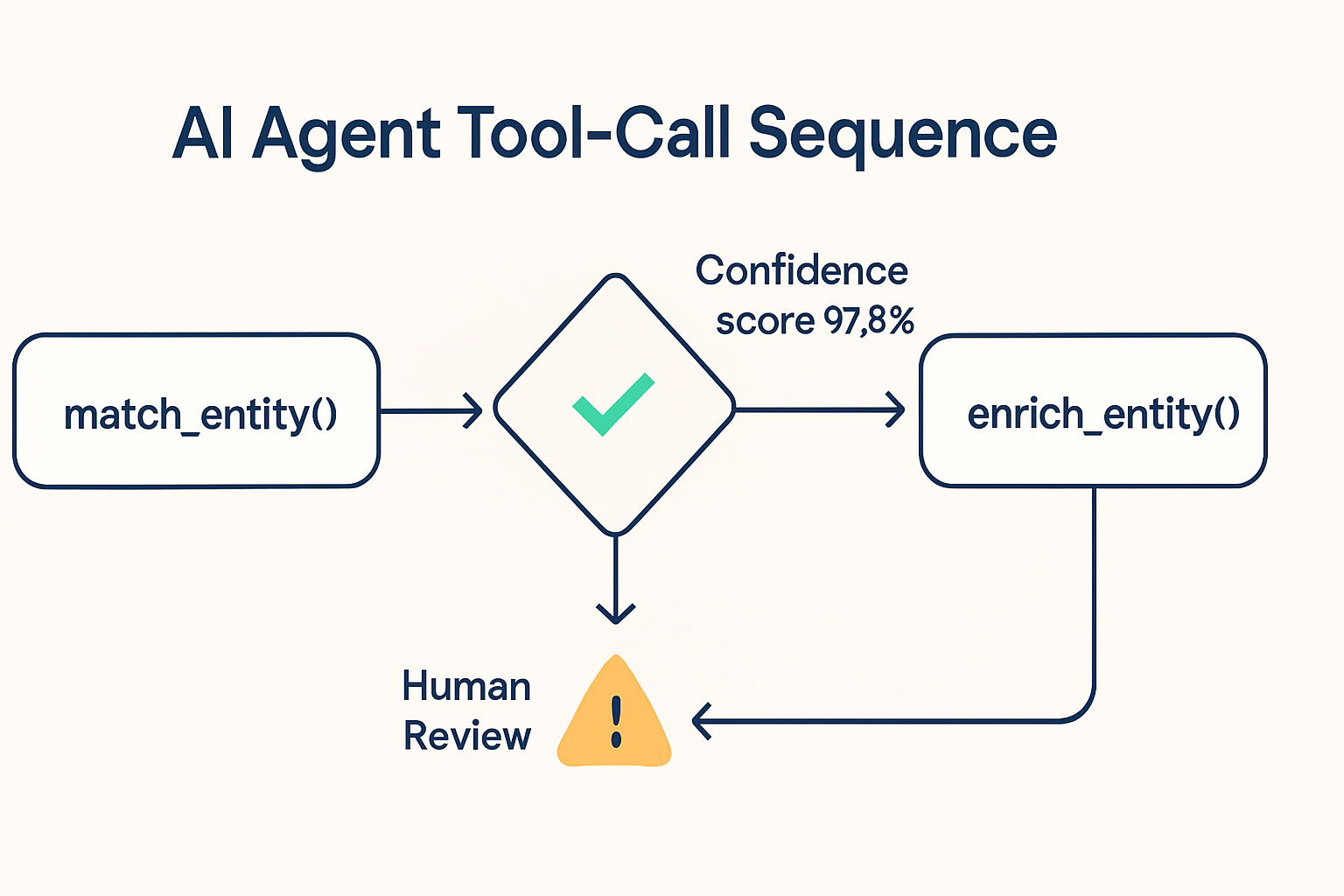
Call order matters: run match first, enrich second, write third. Putting the match call anywhere else defeats the gate.
MCP annotations make the rule explicit: a write that follows a low-confidence match should carry destructiveHint: true so the orchestration layer can pause for human review.
Free to start: open a Vibe Prospecting account at no cost and wire the match call into your agent today without a procurement cycle.
Skipping the gate is not neutral: a silent duplicate write is harder to detect and more expensive to clean up than adding the match call in the first place.
Your AI agent just ran overnight, touched 400 company records, and your CRM now has duplicate entries for Acme Corp, Acme Corporation, and Acme Corporation Inc. Each one has different enrichment data. None of the deal history lines up. Sound familiar? This is the entity matching problem, and the fix is a single check you add before every write call.
Entity matching is the step that asks "does this company already exist?" before an agent enriches or writes a record. Without it, the agent treats every name variant as a new company. With it, every write goes to the right row, and your data stays clean no matter how many overnight runs the agent takes. Vibe Prospecting handles this check through a chat-first connection -- powered by Explorium Enterprise Business Data -- that resolves candidates against a 150M+ company profile store and returns a confidence score your agent can gate on.
This checklist covers the call order, the confidence thresholds, the MCP annotation logic, and how to validate the gate on a small sample before running it at full volume.
Why Plain String Matching Breaks AI Agents
String similarity checks are not entity resolution. They compare characters, not business identities, and they fail in predictable ways that compound every time the agent runs.
What String Matching Misses
"Acme Corp" and "Acme Corporation Inc." share enough characters to flip a similarity score either way, so the agent creates a duplicate about half the time.
A parent company and its subsidiary have completely different names, so a subsidiary lookup always looks like a new company to a string-based check.
When a company rebrands or changes its domain, the old name and new name look like two separate businesses -- and the agent creates two rows for one account.
What Real Resolution Gives You
Matching against a structured profile store resolves name variants, domain changes, and parent-subsidiary links in one lookup instead of guessing from characters.
A numeric confidence score (97.8%+ at the high end) gives the agent a concrete number to gate on -- not a ranked guess that shifts with every run.
A single resolved entity ID threads through every subsequent call in the same run, so enrich and write always reference the same record.
Does Every Agent Need a Match Gate?
Any agent with write access to a shared company or contact table needs one. The question is not whether the risk is large enough to justify the gate -- a duplicate record is already expensive to clean up -- the question is whether you want to find the problem during the run or three weeks later during a pipeline review.
When Skipping the Gate Goes Wrong
The write call returns success, so the agent log shows no error. The duplicate exists and nothing surfaces it until a human runs a report.
Fresh enrichment data attaches to the duplicate row, so the original record stays stale while the wrong one accumulates signal history.
Every downstream step inherits the split -- outreach sequences, scoring models, attribution reports -- and the cleanup cost grows the longer the agent runs.
The Cases Where There Are No Exceptions
Any CRM-writing agent, any enrichment agent that touches company tables, and any agent doing bulk imports all need a match gate before every write. The 2026 MCP specification recommends a human-in-the-loop check before destructive operations, and an unintended duplicate write qualifies.
The Call Order Checklist
The correct sequence is: match, then enrich, then write. Deviating from this order breaks the gate even if the match logic itself is correct.
Where Each Step Goes
Match first, before enrich, before write. Placing the match call after enrichment means you enriched a candidate you have not yet verified.
Carry the resolved entity ID from the match response into every subsequent call. Do not re-derive identity at the enrich or write step.
Log the match decision alongside the confidence score and the record it touched. This lets a human audit the gate and adjust the threshold over time.
Never treat a missing match result as "safe to write." A no-match response means the record is unverified -- flag it for human creation, do not auto-create.
Common Mistakes to Avoid
Running the match call as a background job after the write has already fired -- the duplicate is already in the database by then.
Skipping the gate for bulk imports because the single-record flow seems low-risk -- bulk runs create bulk duplicates.
Using the match score as a sort order rather than a threshold -- a "best match" with 60% confidence is not a safe write.
Route matches at 97.8%+ confidence to auto-write. Route everything below that to human review. That figure is the company match accuracy ceiling from Explorium Enterprise Business Data -- the source behind Vibe Prospecting -- and setting the threshold lower trades safety for automation coverage.
The Three Routing Bands
Confidence score
Routing decision
MCP annotation
97.8% or above
Auto-write, no human step needed
destructiveHint: false
80% to 97.7%
Hold for human review before writing
destructiveHint: true
Below 80%
Flag as a new entity candidate, manual creation
destructiveHint: true
No match returned
Escalate, do not auto-create
readOnlyHint: false, destructiveHint: true
A Note on Alternative Data Sources
Coresignal covers company data depth through a four-stage matching process but does not publish a numeric match accuracy score that an agent can use as a gate value.
Hunter.io's confidence number applies to email-to-domain matching, not company-entity resolution, so it answers a different question than the write gate needs.
Vibe Prospecting returns a single numeric score from the same profile store the agent enriches from -- one call, one number, one gate.
MCP tool annotations tell the orchestration layer how to handle a call before it fires. A write that follows a low-confidence match should carry destructiveHint: true so the agent pauses for a human check rather than writing automatically. The MCP tools specification treats destructive operations as a trigger for human-in-the-loop review, and a possible duplicate write qualifies.
Reading the Four Annotations
readOnlyHint: true means the call only reads data and cannot create or modify anything -- the match call itself is always read-only.
destructiveHint: true means the call can make a change that is hard to undo -- a write that may create a duplicate row is destructive in this sense.
idempotentHint: true means running the call twice gives the same result as running it once -- this prevents a second duplicate, not the first one, so you still need the confidence gate.
openWorldHint: true signals that the call reaches outside the local context -- relevant when the agent writes to a shared CRM table other agents also touch.
Annotation Mapping Table
Tool call
Suggested annotation
Human gate required?
match_entity
readOnlyHint: true
No -- this call is the gate itself
enrich_entity after a clear match
readOnlyHint: false, destructiveHint: false
No, once confidence is 97.8% or above
write_record with confidence 97.8% or above
destructiveHint: false
No, auto-write is safe
write_record with confidence below 97.8%
destructiveHint: true
Yes, hold for human review
What Vibe Prospecting Does for Entity Matching
Vibe Prospecting connects to your agent -- in Claude, ChatGPT, or via the plugin -- and handles the full match, enrich, and link flow from one place, backed by Explorium Enterprise Business Data. You do not need a separate matching vendor alongside an enrichment vendor.
One Connection, All the Data
Company resolution runs against a 150M+ profile store, the same one the agent enriches from after the match clears, so a resolved entity already has company details attached.
800M+ people profiles let the agent resolve a contact-to-company link in the same call -- no second round-trip to a separate identity tool.
50+ underlying data sources feed the same match layer, so a company that appears in only one source still resolves correctly.
Built for the Scale Agents Need
Up to 1,000 entities resolve and enrich in a single call, so a CRM backfill or import cleanup does not require chunking into dozens of smaller requests.
100 QPS sustained throughput means the match gate runs synchronously on every write without slowing the loop -- it does not need to be a background job to stay fast.
Server-side processing keeps entities out of the LLM's context window, so a long agent run does not hit a token ceiling after 20 or 30 records.
Getting Started in Chat
Add Vibe Prospecting from the Claude or ChatGPT Connectors Directory -- no code required for chat use.
A free account with no sales call means you can wire up the gate today. More details at the Vibe Prospecting plugin page.
Credits flow into a shared pool across matching, enrichment, and signal lookups, so adding a match call before every write does not require a separate budget line.
Sample-before-export gating returns 5 records plus a cost estimate before any credits are charged, so you can confirm the confidence scores look right before running at full volume.
"The accuracy and depth of the data is far superior to other providers." - Mid-Market user, G2 review of Explorium
Validating the Gate Before Going Live
Before running the match gate at full volume, test it on companies you already know to confirm the confidence scores are tracking correctly.
Five-Step Validation Process
Step 1: Open a free Vibe Prospecting account -- no sales call, no credit card for the free tier.
Step 2: Add Vibe Prospecting from the Claude or ChatGPT Connectors Directory.
Step 3: Run a sample match on 5 companies you already have clean records for. Confirm the confidence scores come back at 97.8%+ for known matches.
Step 4: Wire match_entity immediately before every enrich_entity and write_record call in your agent's tool-call sequence.
Step 5: Set the auto-write threshold at 97.8%+ and route everything below it to a review queue. Log every decision with the confidence score and the record it touched.
The Short Version
One connection resolves, enriches, and links entities without adding a second vendor to your stack. The match call runs server-side at 1,000 entities per call so it does not slow the agent. A free account removes the setup cost for a safety check that saves cleanup time downstream. The gate pays for itself the first time it catches a duplicate before it reaches the CRM.