The One-Page AI Routing Policy: Who Does What in Your Sales Workflow
An AI routing policy gives every sales task one owner: AI, rules, data, or a person. Build the one-page plan in a chat window and know which layer broke.
Vibe Prospecting team9 min readAugust 23, 2026
TL;DR
An AI routing policy is one page that gives every task in your sales workflow exactly one owner: an AI model, a plain rule, a data lookup, or a person.
The sorting test takes ten seconds per task: if you can check the answer, it goes to rules or data; if you have to judge it, it goes to a model or a person.
The company-facts row holds up everything else. Route those lookups through Vibe Prospecting in chat, drawing on 150M+ company profiles and 800M+ people profiles from 50+ premium sources, so every other row reads the same record.
Pricing answers, contract terms, and anything you cannot undo always go to a person, no matter how confident the model sounds.
Write down four things per run (who handled it, which record it read, which model ran, what it did) and a bad Tuesday becomes a five-minute lookup instead of a week of guessing.
You can draft the whole plan in Claude or ChatGPT this afternoon. Ask, preview 5 records with the cost estimate, then build. Powered by Explorium Enterprise Business Data.
Somewhere in your sales workflow right now, an AI is doing a job a rule should own, a rule is missing where a person should be, and nobody wrote down who decided. An AI routing policy fixes that with one page: every task in the workflow gets exactly one owner, either an AI model, a plain rule, a data lookup, or a human, plus a note on when it hands the work up. Deal counts fell 21.6% in the first half of 2026 while a record $407B poured into AI, per PitchBook. The gap between those two numbers is mostly workflows where nobody assigned the tasks.
You do not need an engineering team to write one. This guide walks through the sorting test, the six questions that pick each owner, a routing plan you can copy, and how to draft the whole thing in a chat window before the end of the day.
Every Task Gets One of Four Owners
The policy is a table, not a philosophy. Each row is a task; each task is owned by an AI model, a plain rule, a data lookup, or a person; and each row says when the owner must stop and hand the work to someone above it.
Here is what goes wrong without it. Two people on the same team wire the same task to different tools at different prices. The AI quietly takes over jobs it should never hold, like updating your CRM records, and gets a few wrong every week in ways nobody sees until a report looks strange. And when a bad email goes out, the postmortem turns into a blame session about the newest tool, because no log says which layer actually failed.
With the page written, the questions get boring in the best way. Who drafts first emails? The model, with review below a set confidence level. Who updates the record? A rule, always. Who answers a pricing question? A person, always. Boring is what you want from a workflow that touches customers.
The Sorting Test: Can You Check the Answer?
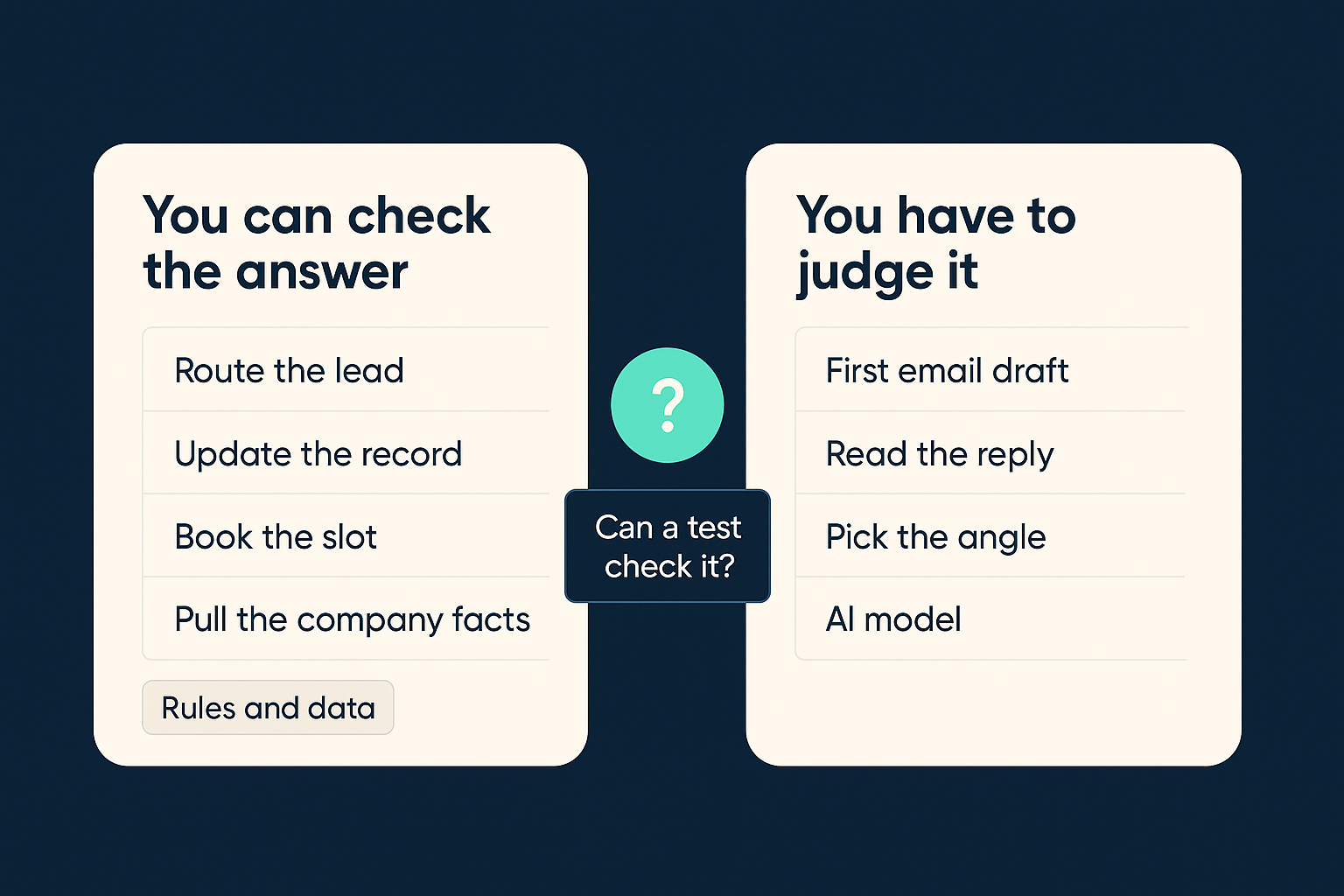
One question sorts most tasks in ten seconds: could a simple test confirm the output is correct? If yes, the task belongs to a rule or a data lookup. If checking it requires judgment, it belongs to a model or a person. Anthropic's guidance on building effective agents draws the same line: use predefined code paths wherever the task allows it.
Checkable Tasks Go to Rules and Data
Sending the right lead to the right rep. A rule gives the same answer every time, and a wrong answer is obvious.
Follow-up timers and reminders. A missed timer is a checkable failure, so let a scheduler own it.
Booking a meeting slot. Calendars are logic, not judgment.
Looking up what a company does, how big it is, and what changed there recently. A data lookup returns a current record; a model answers from memory that stopped updating months ago.
Judgment Tasks Go to a Model or a Person
Drafting the first email to a prospect, where tone and relevance decide whether anyone replies.
Reading replies and deciding which ones are real interest, polite decline, or wrong person.
Choosing the angle for an account, based on what the data lookup surfaced.
Six Questions That Pick the Owner
For anything the sorting test does not settle, ask six short questions per task. The answers point at the owner.
Question
If the answer is...
Then route toward
How bad is a mistake?
Expensive or embarrassing
A person, or a rule with review
How often does it run?
Thousands of times a month
A small model or a rule
Can a test check the output?
Yes
A rule or a data lookup, never a model
How current must the input be?
Current as of this week
A live data lookup, not model memory
How fast does it need to be?
Instant
A rule; overnight is fine for big list refreshes
Will you need to explain it later?
Yes
Anything, as long as the run is written down
The Two Questions Everyone Skips
The mistake question and the explain-it-later question feel optional right up until the week they are not. Score them first, not last. The freshness question gets answered wrong for a different reason: teams assume their saved records are current, and roughly a quarter of them go stale every year. If the input is old, the owner does not matter.
Big Model, Small Model, or No Model
Frontier models cost 10 to 20 times more per call than small ones, and most routing write-ups put 70 to 80 percent of workflow steps in the small-model bucket. The arithmetic is friendly: sorting replies runs thousands of times a month, so it gets the small model; the first email to a dream account runs a handful of times a month, so paying top rates there costs almost nothing in absolute terms and shows up in reply rates. And if a test can check the output, use no model at all.
A Routing Plan You Can Copy
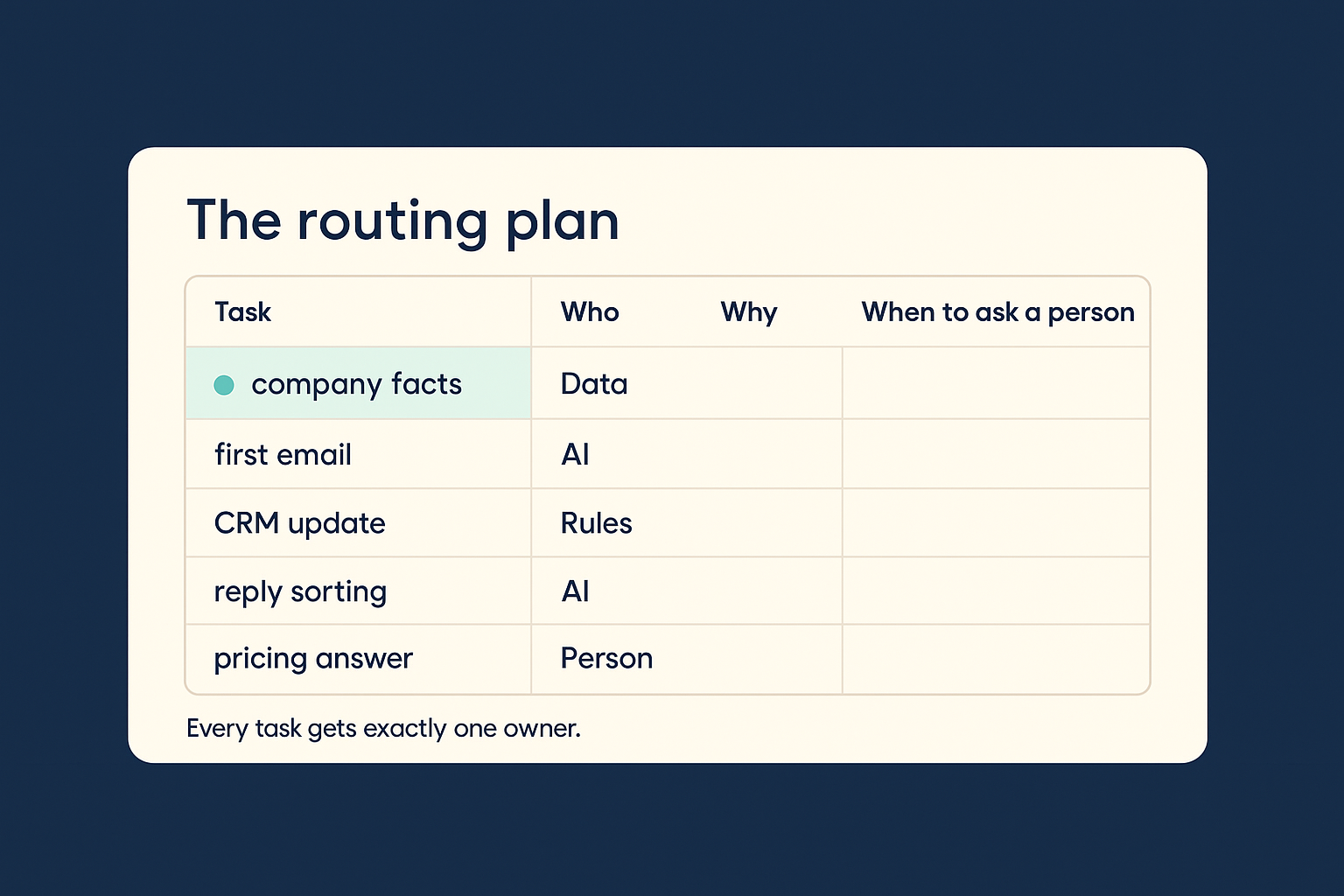
Here is a filled-in page for a standard outbound workflow. Steal it, then edit the rows that do not match yours.
Task
Owner
Why
Hands up when
Pricing or contract answers
Person
You cannot unsend a commitment
Always a person
First email draft
AI model (the good one)
Quality moves replies
Person reviews when the model is unsure
Sorting replies
AI model (the small one)
High volume, low stakes
Better model when unsure
Meeting booking
Rule
Calendars are checkable
Notify the rep on a conflict
CRM record updates
Rule
Silent errors pile up
Never a model
Lead assignment
Rule
Same answer every run
None needed
Company facts, contact details, recent activity
Data: Vibe Prospecting in chat
Every other row reads this record
Flag records that fail to match
Run the Plan From a Chat Window
You do not need a workflow platform to start. Describe your workflow to Claude or ChatGPT and ask it to draft the page with you.
Text
Here is my outbound workflow, step by step: [paste your steps, for example:
find companies that fit, find the right person there, write the first email,
send follow-ups, sort the replies, book the meeting, update the CRM].

Build me a one-page routing plan as a table. For each step, assign exactly one
owner: AI model, plain rule, data lookup, or person. Add a column saying when
that owner must hand the task to a person. Flag any step where I gave an AI a
task that a simple test could check instead.
What comes back is a first draft of the table with owners proposed per row. Argue with it, fix two or three rows, and you have a policy where yesterday you had vibes. Then wire in the row the whole page leans on, the data lookup, by asking for real records instead of the model's memory.
Text
Using Vibe Prospecting: find companies that fit my target size and industry
that have shown hiring or funding activity in the last 30 days, and the person
who owns revenue at each one.

Preview 5 records with the cost estimate before building anything. If the
preview looks right, build the full list.
Note the shape of that ask: preview first, with the cost attached, then build. Five sample records tell you whether the targeting is right before any real spend, which is the routing policy working at the size of a single list.
Connecting Vibe Prospecting
Add Vibe Prospecting from the Connectors Directory inside Claude at claude.ai, under Settings and then Connectors, or from the same directory in ChatGPT. One click, nothing to configure. In Claude Code, the Vibe Prospecting plugin does the same job, and the web app at app.vibeprospecting.ai works without any setup at all. A free account covers everything in this guide.
Why the Company-Facts Row Holds Up the Rest
Every other row reads this one. If the email draft, the reply sorting, and the account scoring each pull company details from a different place, they act on different versions of the same account, and no model quality can repair that. Route all of it through one source.
One Lookup Every Row Trusts
Vibe Prospecting draws on 150M+ company profiles and 800M+ people profiles pulled together from 50+ premium sources, with 97.8%+ company match accuracy, so the record a row reads is the right company nearly every time.
Recent company activity comes from the same place as the plain facts: 18 categories and 80+ types of it, things like hiring, funding, and product moves, next to size, industry, location, and the tools a company runs.
Powered by Explorium Enterprise Business Data. If you want the deeper story on why one shared record beats three lookalike sources, the Explorium team wrote it up in their guide to the B2B data layer, and their introduction to enrichment explains what a lookup actually adds to a record.
Built for the Size of a Real List
Chat tools that drag every record through the conversation stall somewhere around 20 to 100 prospects. Vibe Prospecting builds the list server side, up to 1,000 records per request, so the chat stays a control panel instead of a bottleneck.
Overnight is fine for a list refresh. The freshness question cares that the record is current, not that it arrived in milliseconds.
Pricing is published, credits cover every kind of ask from one pool, and a free account starts with 100 credits and no sales call. That gives the cost column of your routing page a real number; the tiers are on the pricing page, and a side-by-side comparison is worth running against whatever you use today.
"Instead of connecting to multiple data sources and APIs, we only require one connection, Explorium!" Mirit H., mid-market reviewer on G2
When the AI Should Hand It to You
Escalation is a written trigger, never the model's own judgment. Four triggers cover nearly every case.
The model is unsure on a task where mistakes are expensive. Pick a confidence line, write it down, and hold to it; 0.85 is a common starting point.
The action cannot be undone: a pricing commitment, a contract answer, a message to an executive, a deleted record. These go to a person every time, whatever the confidence score says.
The record failed to match. If the data lookup could not confirm which company this is, nothing downstream should act on it.
The same step has already failed twice in one run. Third tries are how small errors become stories.
The opposite failure costs just as much. An assistant that asks permission for everything trains your team to click approve without reading, which turns human review into no review. Write the triggers into the AI's instructions so both problems stay visible.
Text
Escalation rules for this workflow. Follow them exactly:

1. If you are unsure about any task where a mistake is expensive, stop and ask.
2. Never send pricing, contract terms, or messages to executives. Draft them
   and hand them to me.
3. If a company record fails to match or looks stale, flag it and skip it.
4. If the same step fails twice, stop the run and tell me what happened.
5. Everything else: proceed without asking, and log what you did.
The Tuesday Test: When Something Goes Wrong
Some Tuesday a bad email will go out, and the only question that matters is which row of the page failed. Write down four things per run and you can answer it in five minutes.
Who handled the task: which model, which rule, or which person.
Which record it read, and when that record was pulled.
Which version of the instructions or prompt ran.
What it actually did: what was sent, written, or booked, and whether it worked.
Check them in order. Was the record right? Then the data row is fine. Did the model do something reasonable with a correct record? Then the model row is fine. That leaves the action itself. Without the four fields, every failure gets blamed on the newest tool, the tool gets swapped, and the cycle restarts with the same missing page. One shared data lookup makes the first check nearly instant, because the record is either right or wrong in a way you can see.
Your Routing Plan by the End of the Day
The whole exercise fits in an afternoon, and the order matters: data row first, then the sort, then the triggers.
Connect Vibe Prospecting to Claude or ChatGPT and run one preview ask, so the row every other row depends on is real before you route anything else.
List every task in one workflow, from first lookup to booked meeting. Most teams find 8 to 12.
Run the sorting test, then the six questions on whatever is left.
Fill the table, including the hands-up column for every row.
Add the four write-downs to whatever runs the workflow, even if that is a shared doc for now.
One page, four owners, written triggers. That is the difference between money spent on AI and a working pipeline.